Chord Progression Builderwith an Interactive Circle of Fifths
Write chord progressions on a circle of fifths that shows why every chord works: secondary dominants, tritone substitutions, borrowed chords and the right scale over each chord. Then hear it with a band, and play it on guitar with voicings that move smoothly from chord to chord.
Works on desktop, tablet and phone. Your songs stay in your browser.
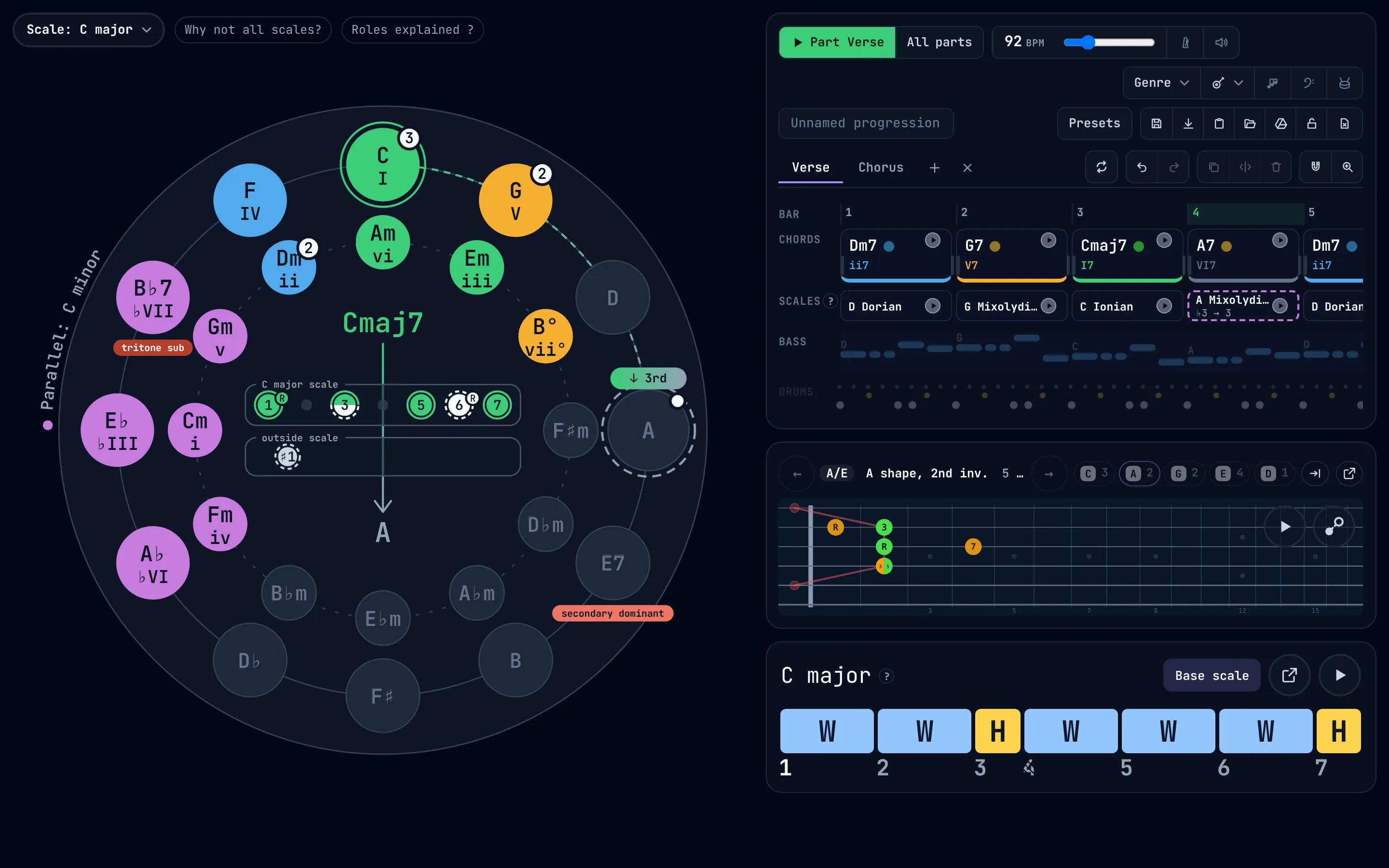
- See why chords workEvery chord is coloured by its role, and each move is named as you hover.
- Hear it with a bandDrums, bass and chords in 28 genres, from Delta blues to bossa nova.
- Play it on guitarEach chord as a CAGED voicing that sits close to the one before.
- Know what to solo withA scale under every chord, with the notes that change from the key.
A circle of fifths that explains every chord change
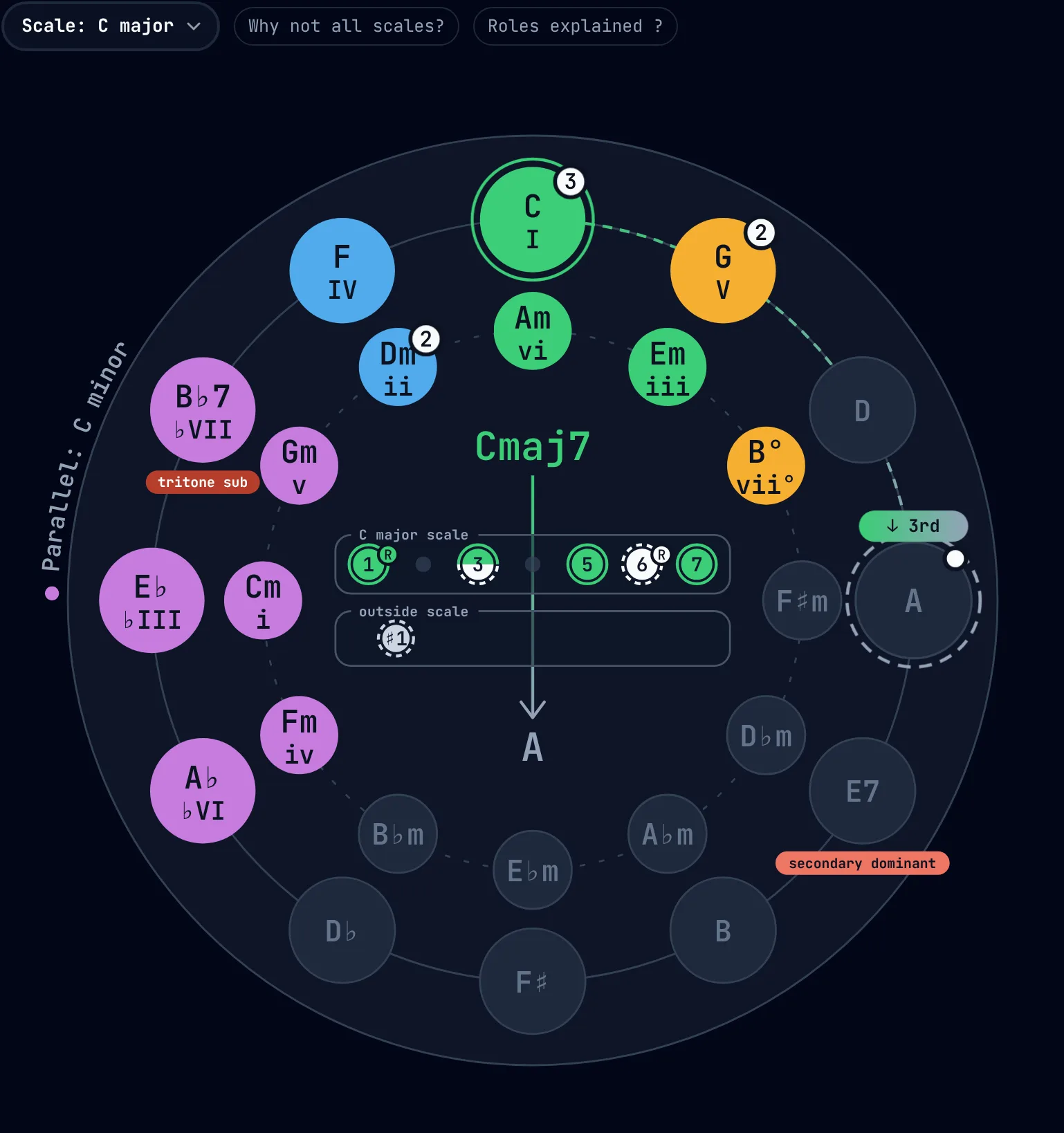
The circle holds all of harmony on one page: the 12 major keys round the outside and their relative minors inside. The builder marks the chords of your key and colours them by role: green for home, blue for the chords that lift away, amber for the ones that pull back. Hover any chord to see what happens if it comes next.
- Hover a chord to try it as the next one. Here A follows Cmaj7.
- The root motion from the chord before: down a third.
- Which notes of the new chord are in the key, and which come from outside it: the C♯ that makes A major sound bright in C.
- The secondary dominant that leads into it: E7, the V7 of A.
- Its tritone substitution: B♭7 shares E7's 3rd and 7th and slides into A by a half step.
Secondary dominants, tritone subs and the backdoor dominant
These are the moves that make a progression sound like jazz, soul or a Beatles bridge instead of three chords. The builder finds them for whatever chord you point at, in any key.
| Device | What it does | In C major |
|---|---|---|
| Secondary dominant | The V7 of a chord other than home, borrowed to point at it | A7 → Dm, E7 → Am, D7 → G |
| Tritone substitution | A dominant 7th a tritone away, with the same 3rd and 7th | D♭7 → C in place of G7 → C |
| Backdoor dominant | ♭VII7 resolving home from a whole step below | B♭7 → C |
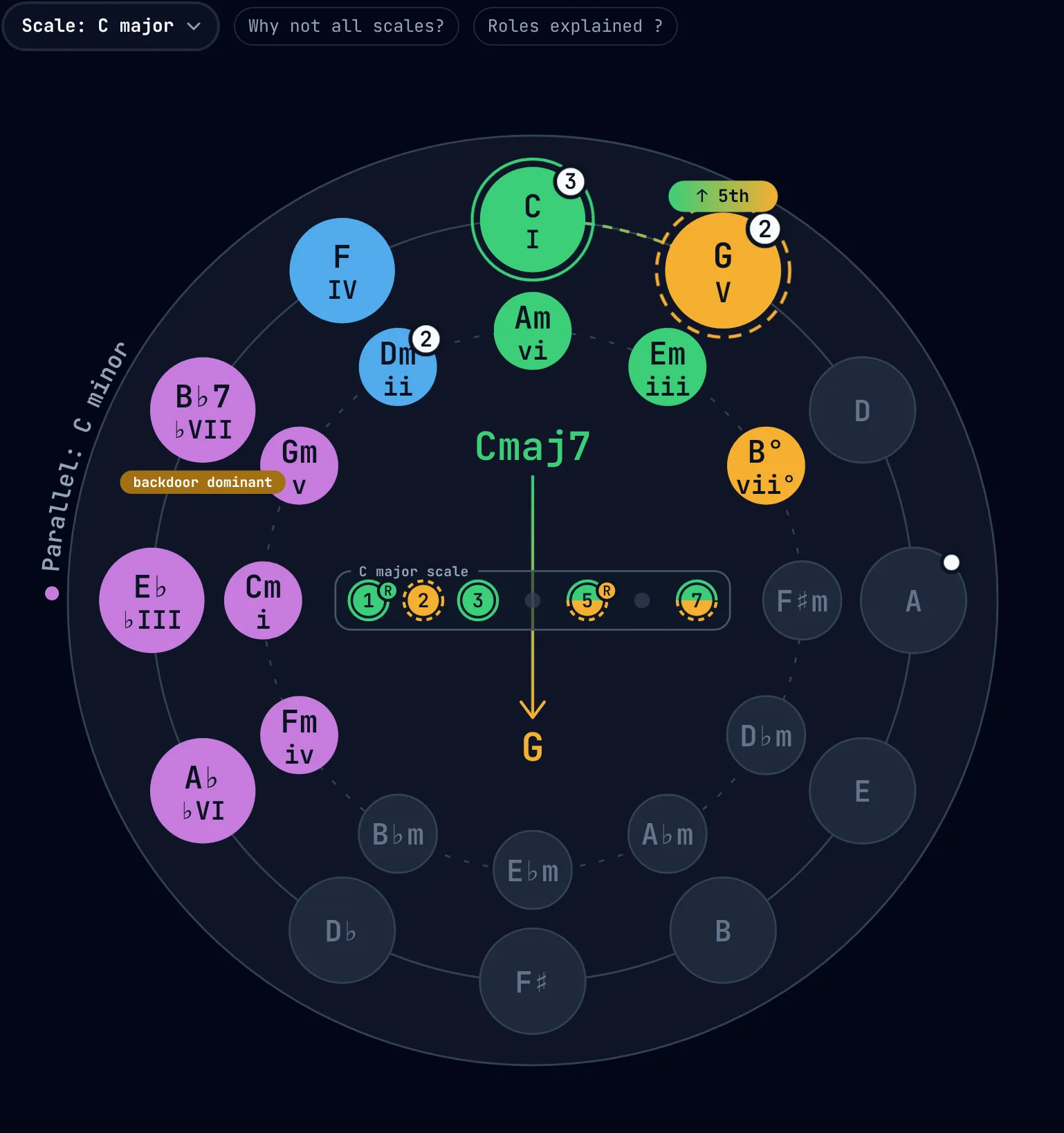
- Hover the V chord of the key, here G.
- The backdoor dominant lights up: B♭7, the other way home.
- All of G's notes are in C major, which is why V → I sounds so settled.
Borrowed chords from the parallel minor
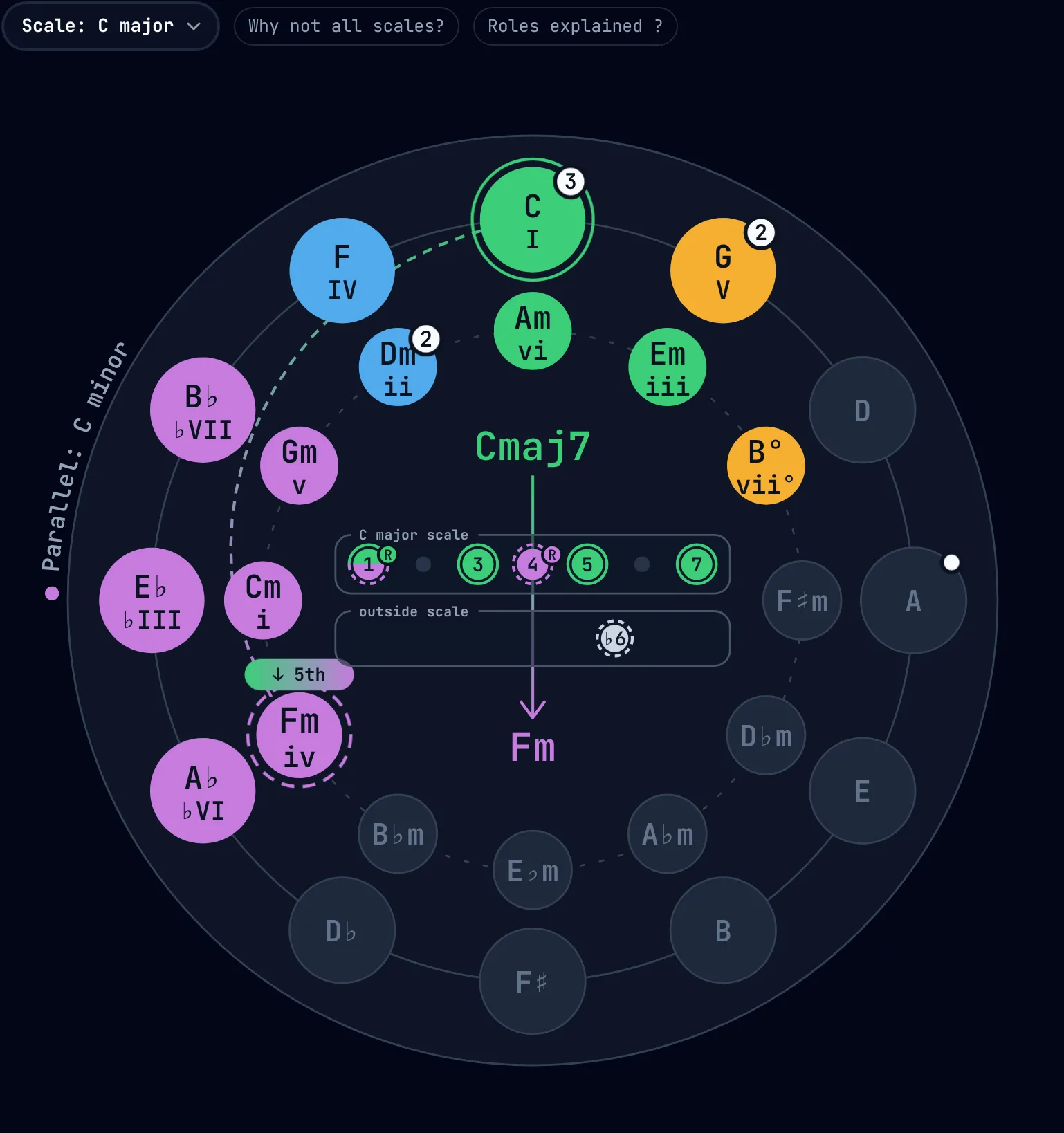
The purple chords are on loan from C minor: Fm, A♭, B♭, E♭ and Cm. Borrowing them, called modal interchange, is how a major-key song gets its darker turns, such as the ♭VI–♭VII–I ending of a rock anthem or the minor iv of a ballad.
- Fm, the iv of C minor, following Fmaj7: the A drops to A♭.
- The parallel key the purple chords come from, named on the rim.
- The note from outside C major that gives the chord its colour: A♭.
Modes on the circle: Dorian, Mixolydian, Lydian and more
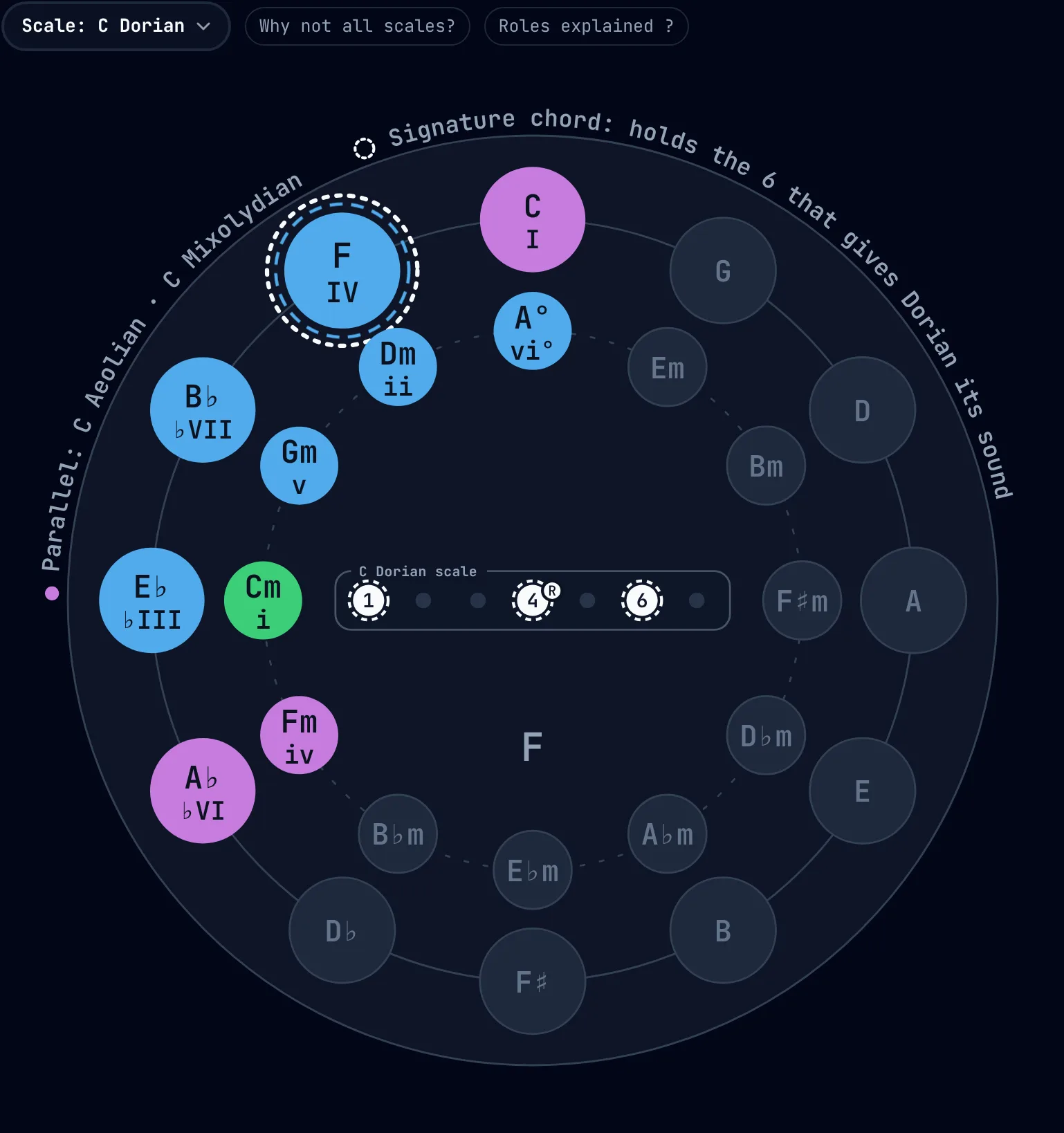
Pick a mode instead of a plain major or minor key and the circle marks that mode's chords: Dorian, Phrygian, Lydian, Mixolydian and natural minor, the modes of melodic minor such as Lydian dominant, and harmonic minor. Each mode has one chord that holds its characteristic note, and the builder rings it.
- The scale menu, set to C Dorian.
- The signature chord: F major holds the major 6th (A) that gives Dorian its sound. Use it and the mode is heard; leave it out and it sounds like plain minor.
- The neighbouring scales on the same root, C Aeolian and C Mixolydian.
Roles explained sums up each key: its tonic, subdominant and dominant chords, the typical moves and songs that use them.
The right scale over every chord
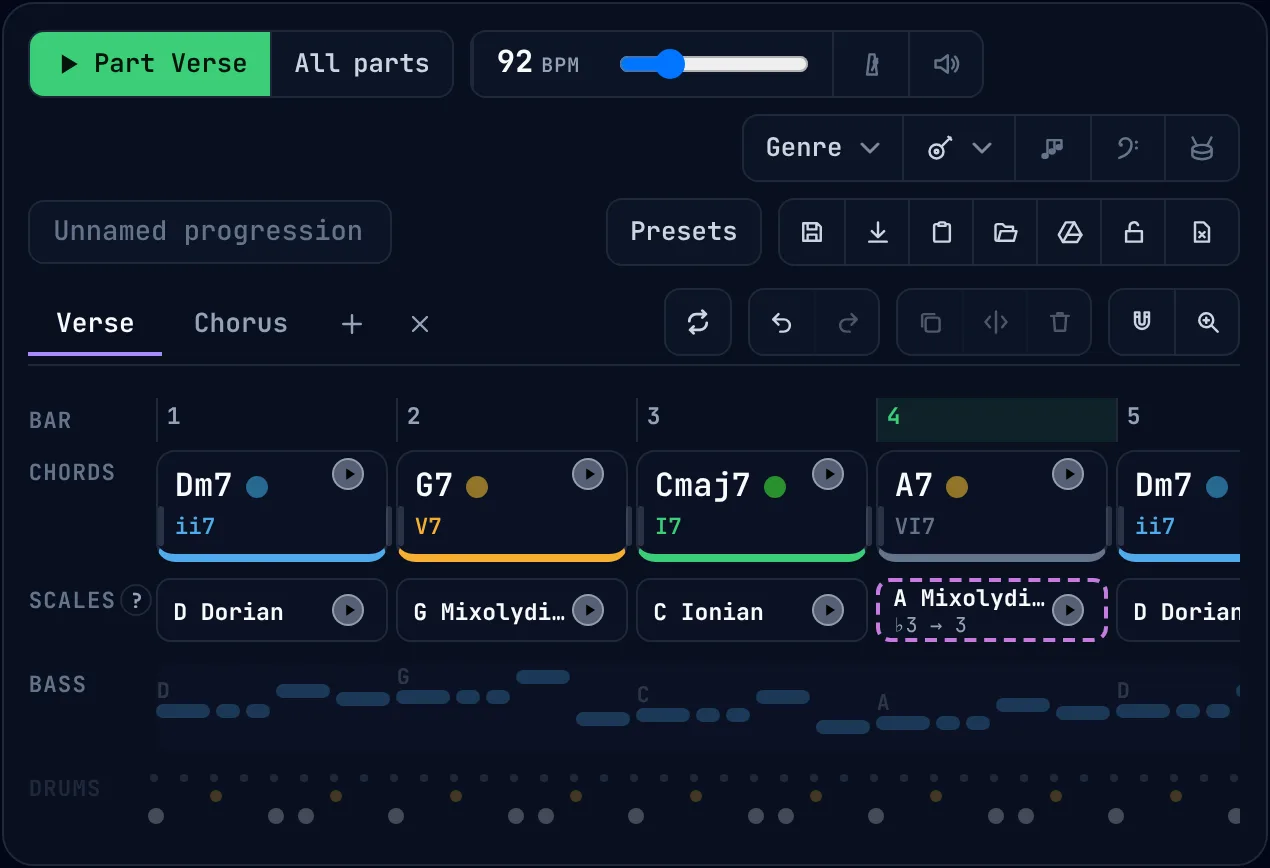
Under the chords runs a scale lane: a scale that fits each chord and the key around it, ready to solo or write a melody with. When a chord steps outside the key, its scale does too, and the lane tells you exactly which note changes.
- The chords, each with its Roman numeral, coloured by role.
- The scale for each chord: D Dorian over Dm7. Press play to hear it.
- A dashed border marks a scale that leaves the key. Over A7, A Mixolydian ♭6 changes one note of the key: ♭3 → 3, the C♯.
- The bass line the band plays.
- The drum pattern.
Compare the scales that fit a chord
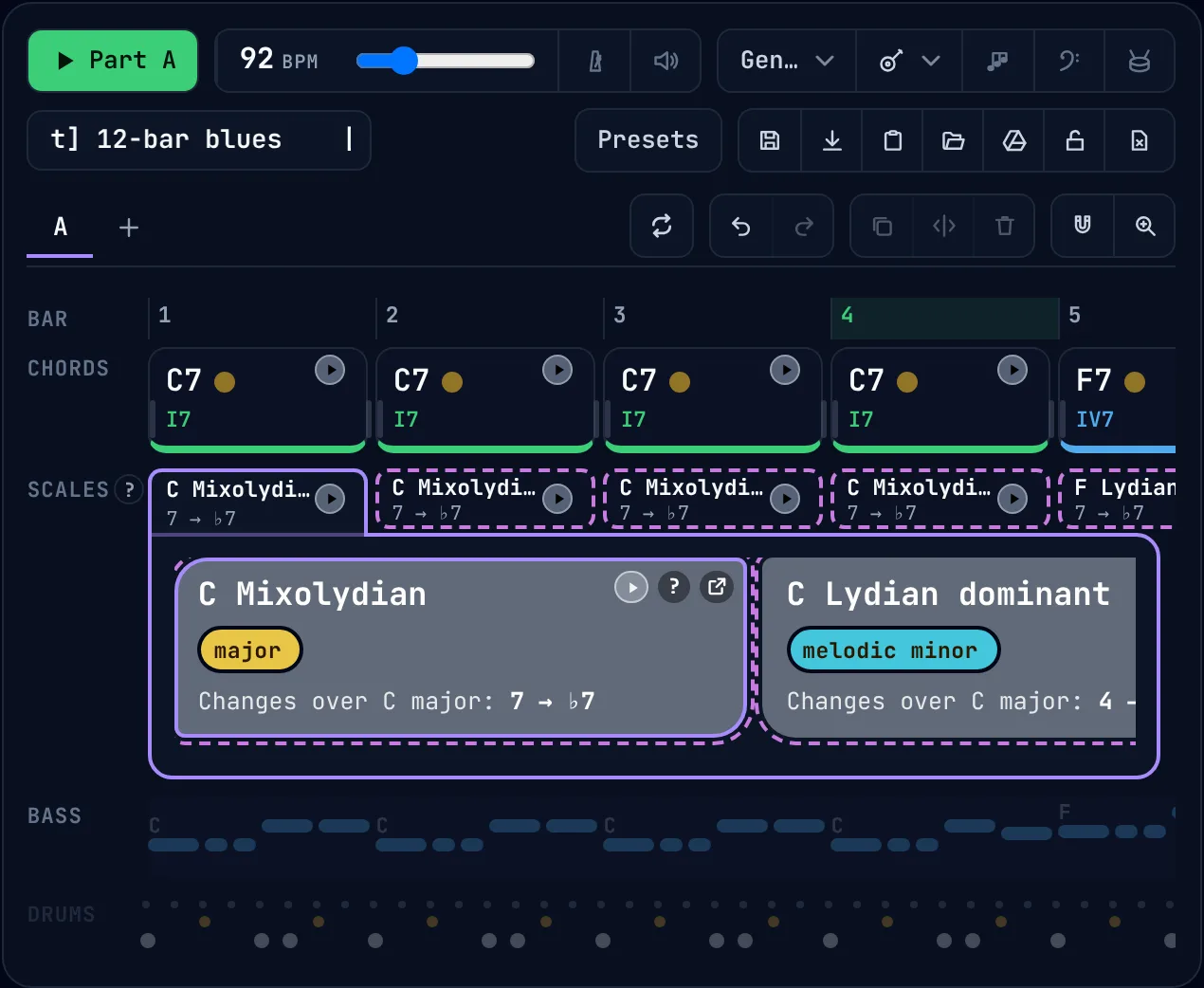
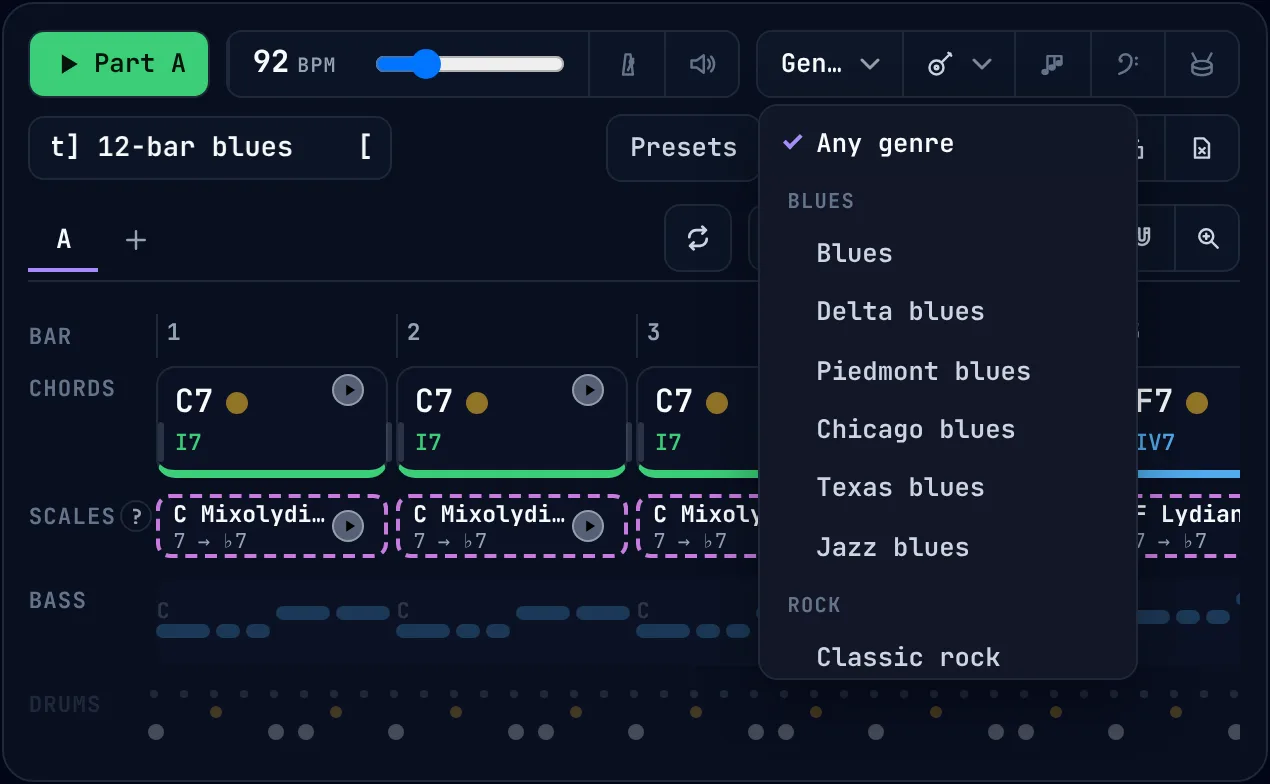
Click a scale to see every scale that fits the chord, side by side. Over the C7 of a 12-bar blues:
- The scale chosen for the chord.
- C Mixolydian changes one note of C major: 7 → ♭7.
- C Lydian dominant also raises the 4th, for a brighter, jazzier sound.
Swap a chord for a richer one: 9ths, 13ths and altered dominants
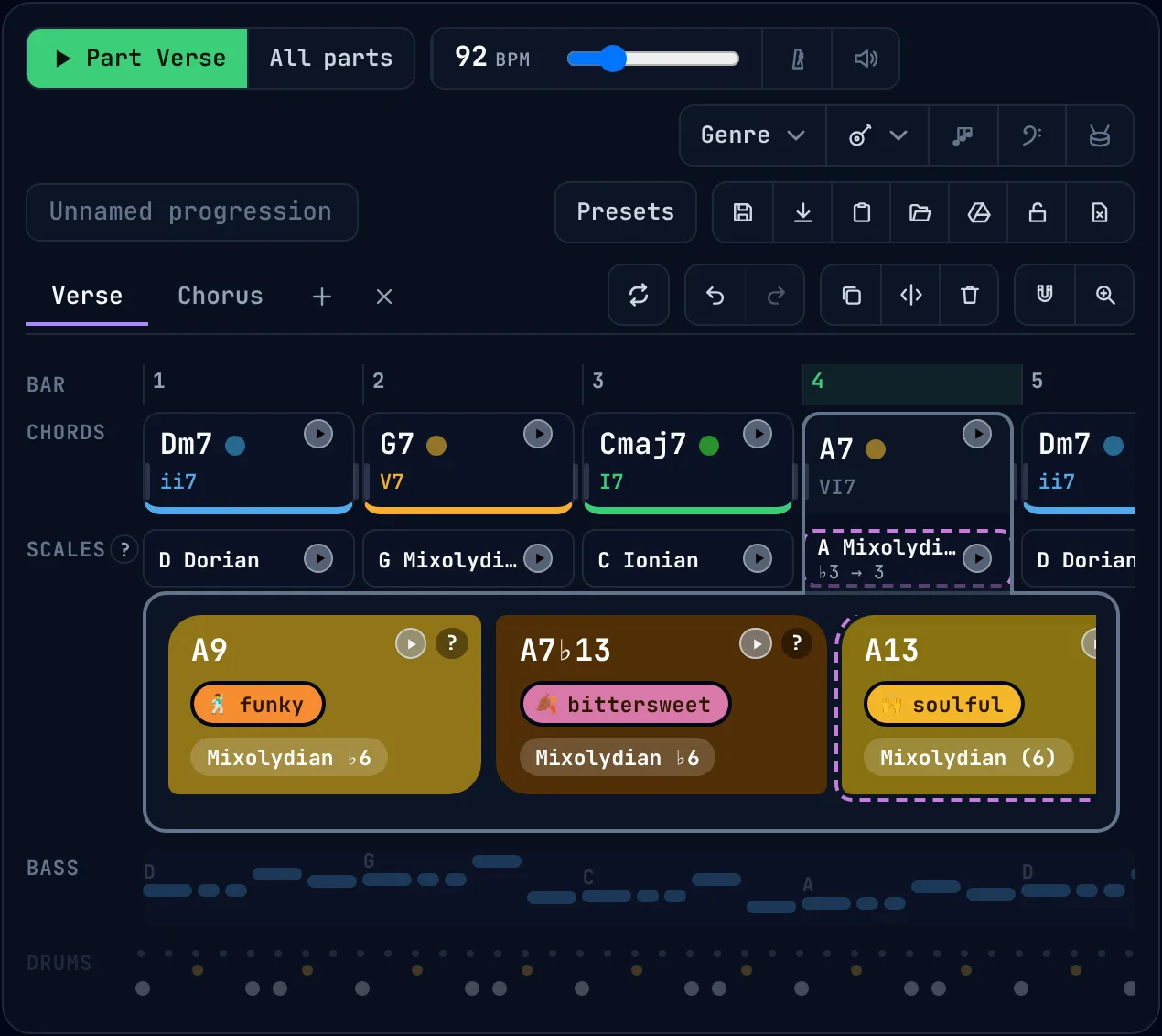
Click any chord to see the colours it can take, each labelled with its mood and the scale that goes with it. It is the quickest way to hear the difference between a plain A7 and the chords jazz and soul players reach for.
- Click a chord in the timeline, here A7.
- A9, marked funky, with the scale it implies.
- A7♭13, marked bittersweet. A13, marked soulful, is next to it.
Guitar voicings that move smoothly: close voicing and CAGED shapes
Every chord appears on the fretboard as a real guitar voicing. With smooth transitions on, the builder chooses the voicing closest to the chord before, so each finger moves a fret or two instead of jumping across the neck. That is voice leading, worked out for you.
- The voicing on show: A7 from the A shape, 2nd inversion. The arrows step through every voicing.
- The five CAGED shapes, with how many voicings each one has for this chord.
- Lines show where each note moves from the chord before, so you see the voice leading before you play it.
Pin a voicing you like to keep it, add octave doublings for a fuller sound, or open the chord in the chord library.
How the CAGED system works →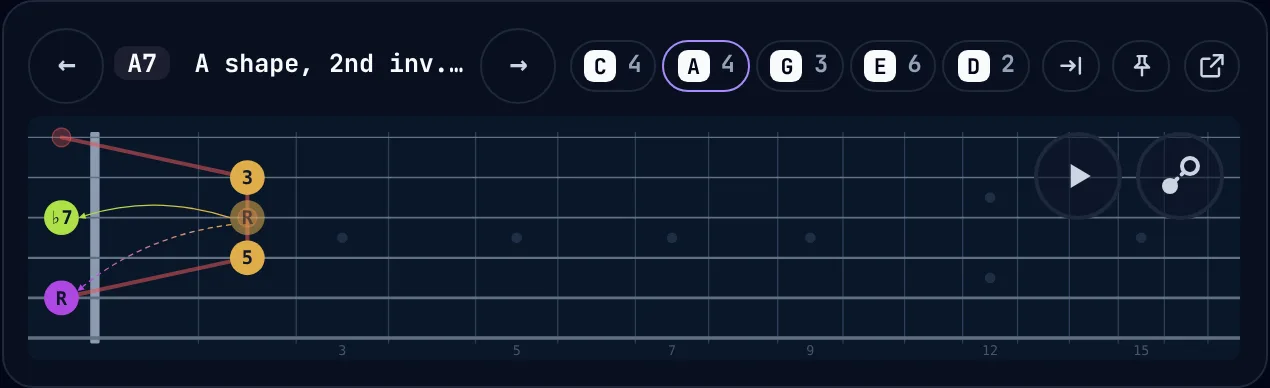
A simple DAW for chord progressions, with a band that plays them
Everything a songwriter needs to sketch a song and practise over it, without the menus of a full recording program.
A backing band in 28 genres
Drums, a walking or rocking bass line and strummed or arpeggiated chords, in blues, rock, pop, funk, soul, gospel, reggae, swing, modal jazz, bossa nova, country, folk and more.
Guitar, piano or strings
Choose the instrument that plays the chords, and switch the bass, drums and arpeggio on or off.
Parts and song order
Write a verse and a chorus as separate parts, each in its own key, and play one part or the whole song.
Bars and beats
Drag a chord's edge to change how long it lasts, snap to a bar, a beat or finer, and split or duplicate chords.
Loops
Loop the bars you are working on and set how many times they repeat before the song moves on.
Tempo and metronome
Set the tempo in BPM, turn on the metronome, and press the space bar to play or stop.
Undo, redo and lock
Every edit can be undone. Lock a finished song so a stray click cannot change it.
Save, download and sync
Songs are saved in your browser, can be downloaded as files, and sync between devices through your own Google Drive.
Chord progressions to open in the builder
Each card opens the builder with the progression loaded, so you can hear it, see it on the circle and change it. The pictures are the builder itself.
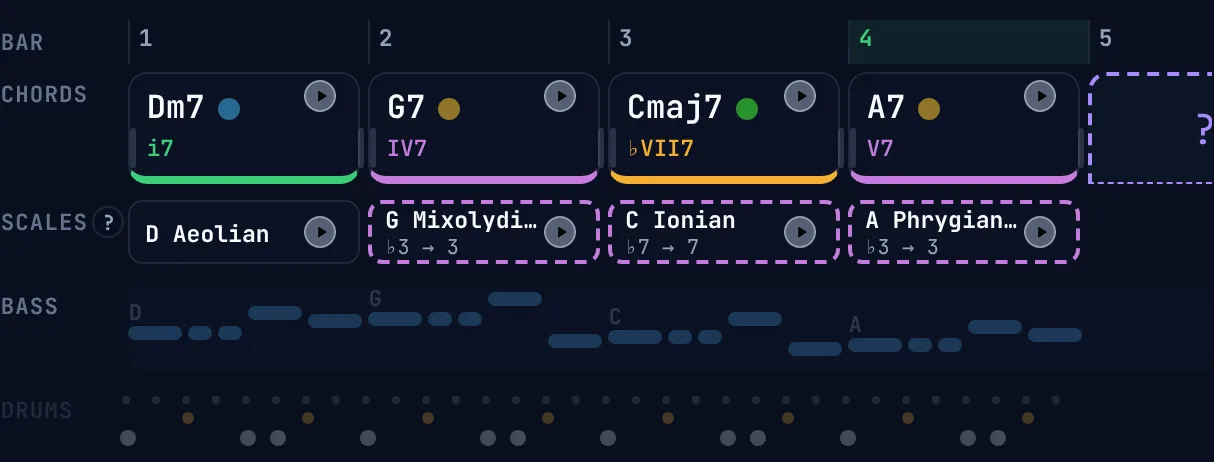 Jazz ii–V–I with a secondary dominantii7 – V7 – Imaj7 – VI7The classic jazz cadence. A7 is the V7 of Dm7, so it pulls the loop back to the start.Open in the builder →
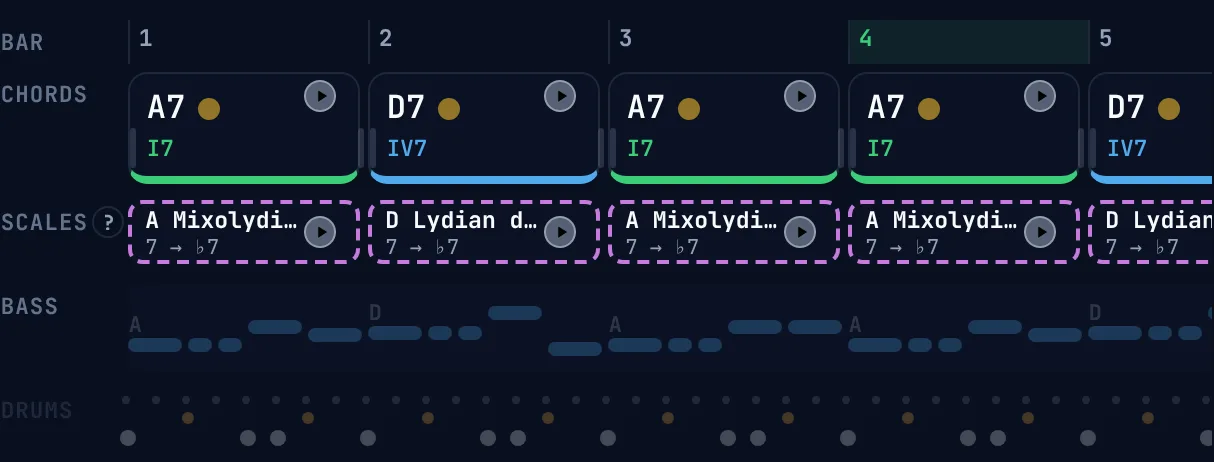 12-bar blues in AI7 – IV7 – V7Three dominant 7th chords and a scale choice over each one, from Mixolydian to Lydian dominant.Open in the builder →
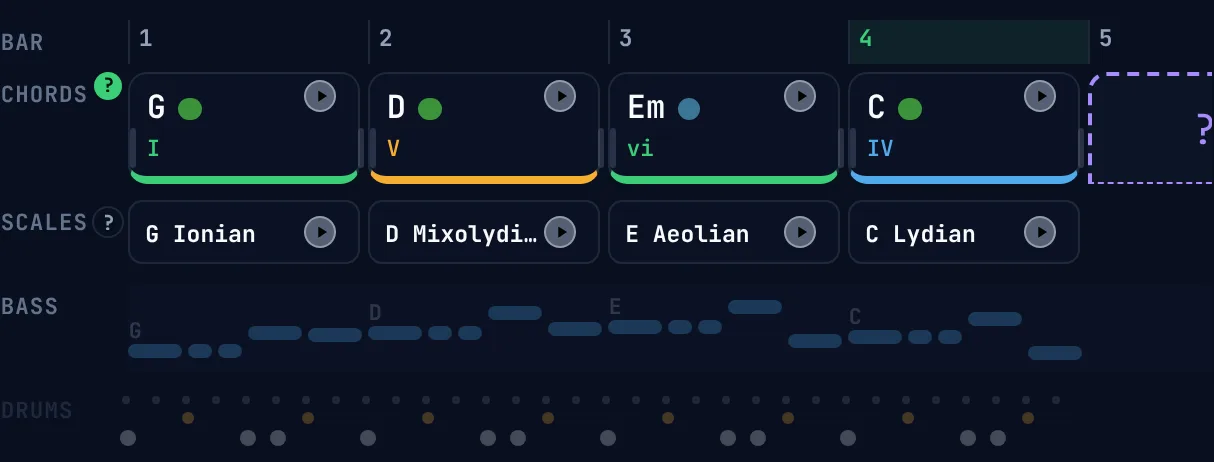 I–V–vi–IV pop progression in GI – V – vi – IVThe four chords behind countless pop songs. It never resolves, so it loops forever.Open in the builder →
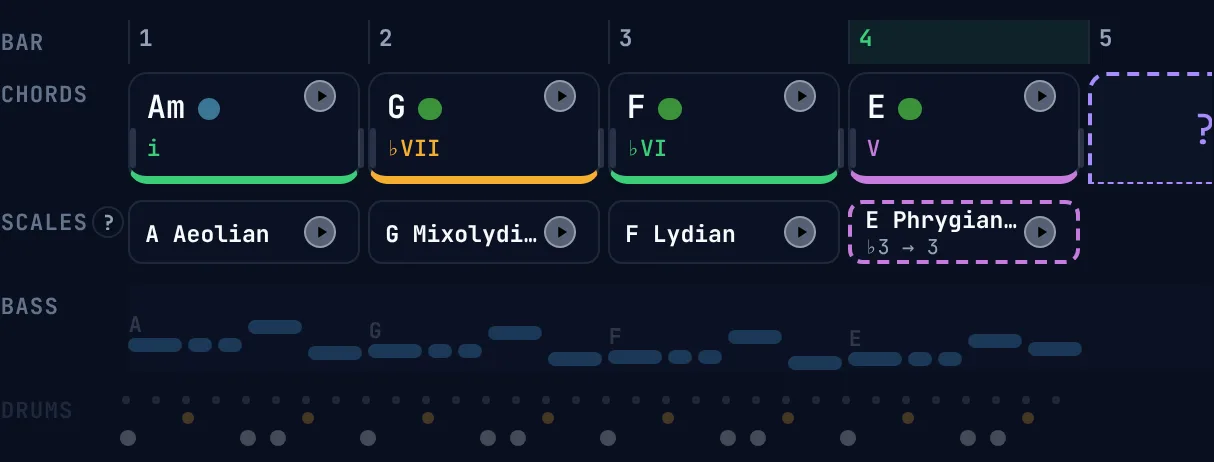 Andalusian cadence in A minori – ♭VII – ♭VI – VA walk down to a major V borrowed from harmonic minor: flamenco, surf rock and Hit the Road Jack.Open in the builder →
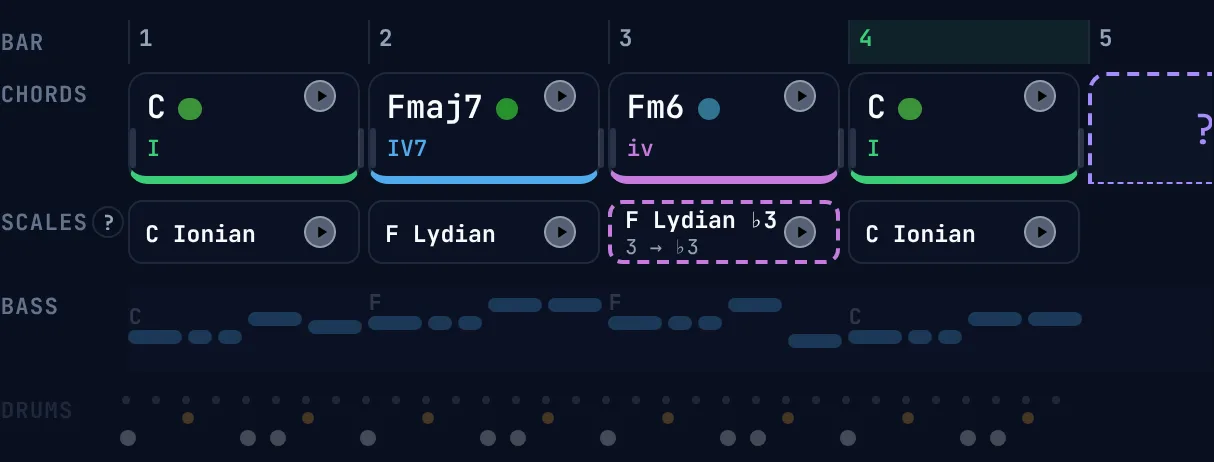 Minor plagal cadenceI – IVmaj7 – iv6 – IFm is borrowed from C minor. The A dropping to A♭ is a bittersweet sound heard in countless ballads.Open in the builder →
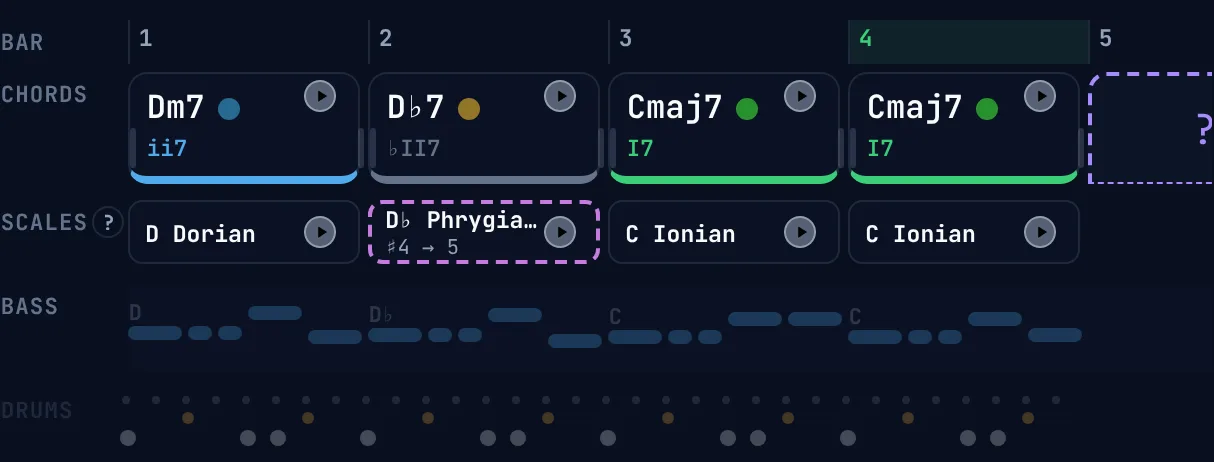 Tritone substitution turnaroundii7 – ♭II7 – Imaj7D♭7 stands in for G7. The bass slides down by half steps: D, D♭, C.Open in the builder →
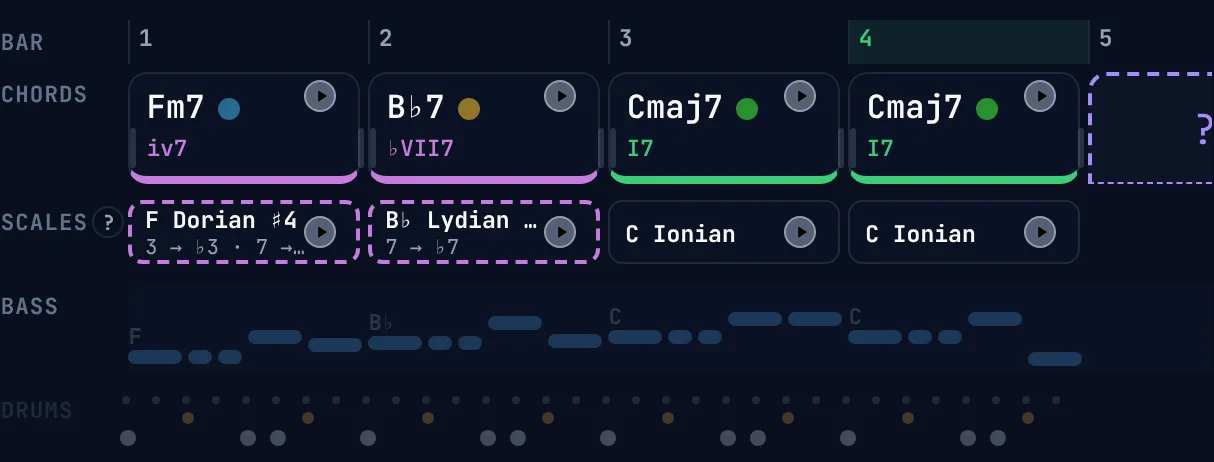 Backdoor ii–Viv7 – ♭VII7 – Imaj7Home through the back door: B♭7 resolves to C from a whole step below instead of from G7.Open in the builder →
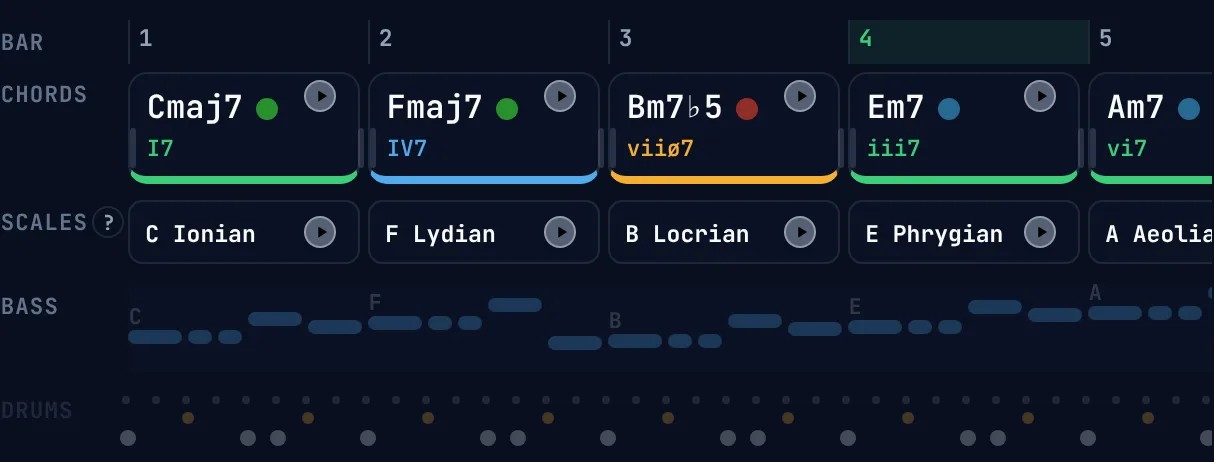 Circle-of-fifths runI – IV – vii – iii – vi – ii – V – IEvery root falls a fifth, all the way round the circle to home. Fly Me to the Moon and Autumn Leaves.Open in the builder →
Start from a classic chord progression
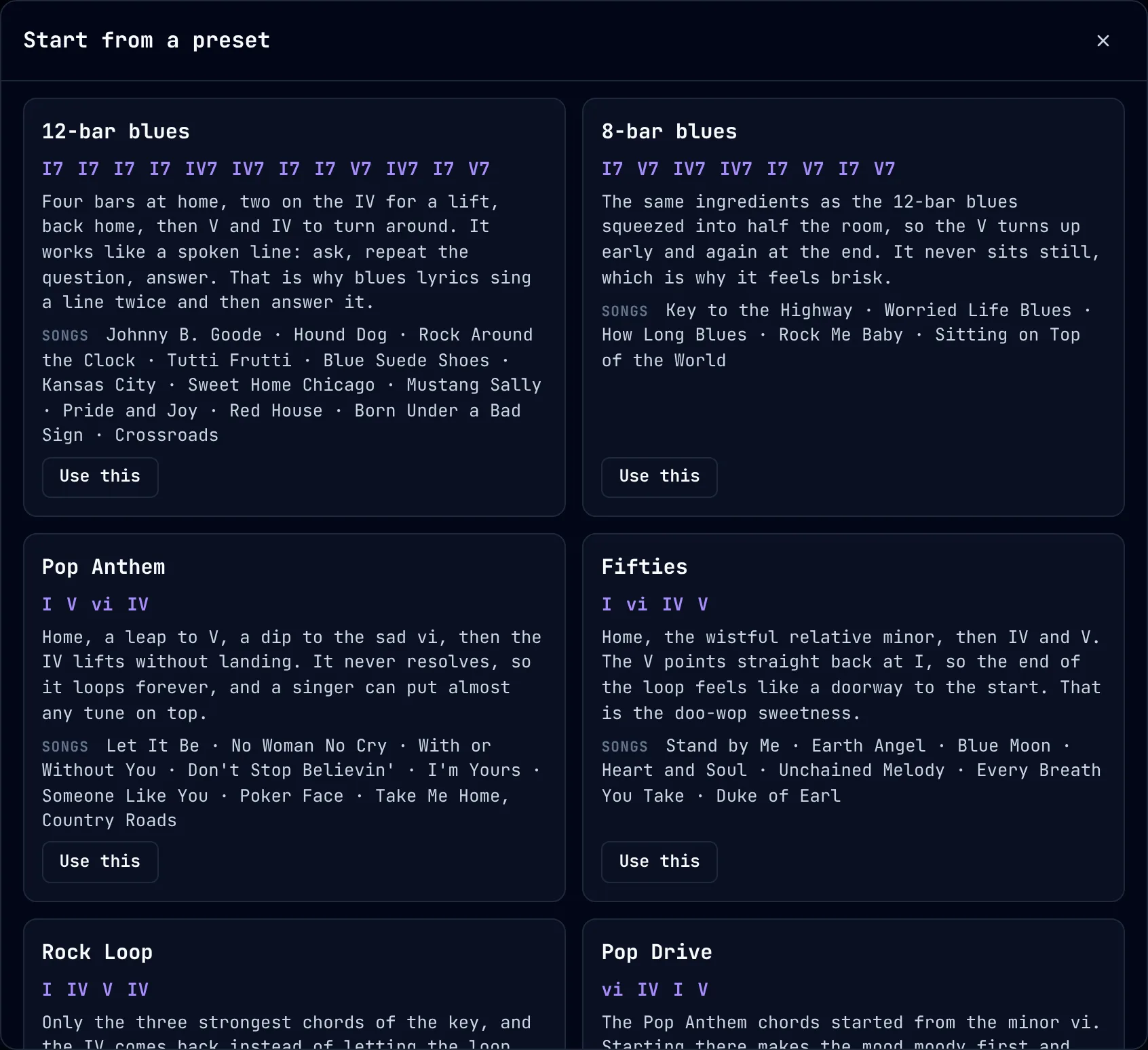
The preset library holds the progressions behind thousands of songs: the 12-bar and 8-bar blues, I–V–vi–IV, the fifties progression, ii–V–I and the jazz turnaround, the Andalusian cadence, Dorian and Mixolydian vamps, the line cliché and the circle-of-fifths run.
- Written in Roman numerals, so every preset works in any key.
- Songs that use it, so you can hear it in music you know.
- One click loads it into the timeline, ready to play and change.
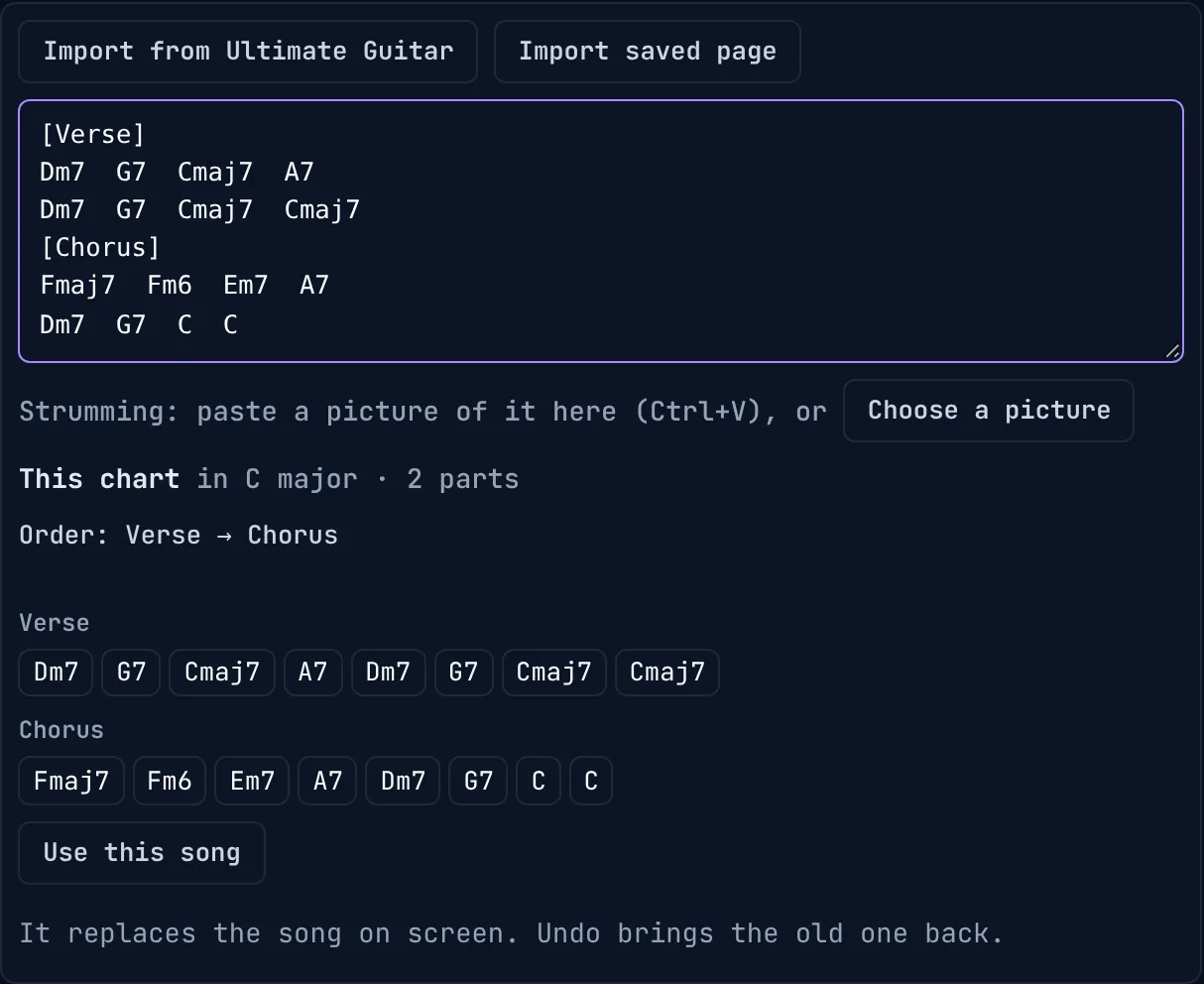
Import a song's chords from a chord chart
Paste the chords of any song and the builder turns them into a progression you can play, study on the circle and practise over.
- Paste a chord chart. Chord lines are read and lyrics are ignored, and section names become parts.
- The key is found for you, here C major, with the song's parts and order.
- Each part's chords, ready to check before you load the song.
A bookmark button brings in the chords, sections and strumming of an Ultimate Guitar song page, without the lyrics. Capo charts can be read as the shapes you play or the chords that sound, and a picture of a strumming pattern is read into the groove.
Frequently asked questions
Is the chord progression builder free?
Yes. It is free, runs in the browser and needs no account. Songs are kept in your browser, and you can download them as files or sync them to your own Google Drive.
Do I need to know music theory to use it?
No. Start from a preset or paste the chords of a song you know, then hover the circle of fifths: it names every move for you, such as a secondary dominant, a borrowed chord or a tritone substitution, so the theory comes from the music you are playing.
How does the circle of fifths help build chord progressions?
Neighbours on the circle share all but one note, so chords next to each other move smoothly, and a root that falls a fifth (G to C, D to G) is the strongest pull in harmony. The builder marks the chords of your key on the circle and colours them by role, so you can see which chord leads where before you hear it.
What is a secondary dominant?
A dominant 7th chord that leads to a chord other than the home chord. In C major, A7 is the V7 of Dm and E7 is the V7 of Am. Hover a chord on the circle and the builder lights up its secondary dominant.
What is a tritone substitution?
Replacing a dominant 7th chord with the dominant 7th a tritone away, such as D♭7 in place of G7 before C. Both chords share the same 3rd and 7th, so the substitute resolves just as strongly, with a bass line that slides down by a half step.
What is a backdoor dominant?
The ♭VII7 chord resolving home from a whole step below: B♭7 to C in C major. It sounds softer than G7 to C, and is a staple of soul, gospel and jazz ballads. Hover the V chord of your key to see it.
Can I use it as a backing track to practise over?
Yes. Pick one of 28 genres, from Delta blues to bossa nova, and the builder plays your progression with drums, bass and strummed or arpeggiated chords on guitar, piano or strings, with a metronome and loops for the bars you want to repeat.
Can I import the chords of a song?
Yes. Paste a chord chart and the builder reads the chord lines, ignores the lyrics, finds the key and splits the song into its parts. A bookmark button brings in the chords, sections and strumming from an Ultimate Guitar song page.
Does it show how to play the chords on guitar?
Yes. Every chord is shown on the fretboard as a voicing from one of the five CAGED shapes. With smooth transitions on, the builder picks the voicing closest to the chord before, so your hand barely moves.
Build your first progression
Open the builder, click a few chords on the circle and press play. It is free and nothing to install.